
A networked game is two worlds pretending to be one: the server holds the real one, and the client holds an approximate copy that lags slightly behind. Most of the replication bugs I've written came from forgetting which copy a line of code was running in.
I'm currently working on a two-player coop game in Unreal Engine 5.7. One player hosts and the other joins, which gives a listen server and a single client, the smallest multiplayer setup there is. It contains every concept of Unreal networking without the weight of dedicated servers or large player counts, which makes it a good size to build a mental model. This article shares mine, and it applies to bigger setups as well.
Two worlds, one game
When player 2 joins, there are two processes running your game:
- The listen server holds the authoritative world and also runs player 1's rendering, input and UI in the same process: the host is both a player and the server.
- The client is a separate process holding a replica of the world.
Everything else follows from one rule: replication flows one way, from server to client. The server pushes actor spawns, destroys and property values down to the client, and the client never replicates anything back: its only way up is Server RPCs, which carry events such as input.
Client code can technically write to a replicated variable, but nothing is sent: the client's copy diverges from the truth and stays that way until the server changes that property again, since replication only sends changes. Instead, you want to notify the server, and let the server perform the change and synchronize the value.
The two worlds also don't contain the same objects:
| Object | Listen server (player 1) | Client (player 2) |
|---|---|---|
| GameMode | exists | does not exist |
| GameState | authoritative | replica |
| PlayerController of P1 | exists | does not exist |
| PlayerController of P2 | exists | exists (owned by P2) |
| PlayerState of P1 and P2 | authoritative | replicas |
| Pawns | authoritative | replicas |
| HUD, widgets | P1's only | P2's only |
This table answers the question "where do I put this code?". Game rules go in the GameMode, so they can't run on a client. State that both players must see goes in GameState (match phase, objectives) or PlayerState (score, character selection), and UI is local by construction. Finally, a PlayerController is private: player 2 can't see player 1's controller, so it's a good place for state that only concerns one player, like camera or input mode, and a bad place for anything the other player needs to read.
Authority, ownership and possession
In casual conversation, "who owns this" covers three different concepts. Mixing them up is a classic source of bugs, so let's split them.
Network authority tells which world holds the truth for an actor, and Unreal answers two questions that sound alike:
- Is this copy of the actor the truth? That's the actor's local role, checked with
HasAuthority(), a shorthand forGetLocalRole() == ROLE_Authority. The copy that holds the truth isROLE_Authority, most replicas areROLE_SimulatedProxy, and the pawn controlled by the local player isROLE_AutonomousProxy(it receives your input directly, which is what makes client-side prediction possible). - Is this process the server? That's the world's net mode, returned by
GetNetMode():NM_ListenServeron the host,NM_Clienton the client,NM_Standalonewhen playing offline.
For a replicated actor the two answers match, since the server spawns it and holds its truth. Gameplay code in replicated actors only needs HasAuthority(), and it's the check you'll write most often: when a door opens or damage is applied, it guards the state change on the host, and the same code keeps working in standalone, where the single process is the authority for everything.
Some code asks about the process itself, and no actor's authority can answer it. The pause menu is a good example: the host gets a "Return to lobby" button that brings both players back, while the client gets "Leave game". A widget has no role, and the question is about the machine, so check the net mode: GetWorld()->GetNetMode() != NM_Client is true on the host, and in standalone as well.
Actors that don't replicate are the other place where the two answers differ. Each process loads or spawns its own copy, and each copy is the authority of its own world, so HasAuthority() returns true on every machine. That's what you want for local cosmetics like ambient birds, which each machine animates on its own.
Connection ownership tells which player an actor belongs to, network-wise. Every actor has an Owner pointer, and if following it upward reaches a PlayerController, the actor belongs to that player. In our two-player game, the client owns three things: its PlayerController, the pawn it possesses, and anything spawned with one of those as owner. Everything else belongs to the host or to nobody: the other pawn, and every actor placed in the level like doors, pickups or interactables. Ownership gives no right to modify an actor: it decides who may exchange RPCs about it.
| Action on a replicated actor | On the listen server | On the client |
|---|---|---|
| Modify replicated state | allowed, this is the truth | silently diverges |
| Call a Server RPC on it | executes immediately (already on the server) | delivered if the client owns the actor, dropped silently otherwise |
| Client RPC (sent by the server) | executes immediately if it targets the host's own player | executes if the client owns the actor |
| Multicast RPC (sent by the server) | executes | executes |
| Read replicated state | the truth | slightly late copy |
On the listen server, RPCs are plain function calls executed on the spot, without going through the network. That's why everything executes in the host column, and why RPC mistakes never show up on the host's screen.
Pay attention to the "dropped silently" cell: when the client calls a Server RPC on an actor it doesn't own, the call never arrives and no error is raised. Since the client owns almost nothing, Server RPCs don't belong on world actors: a Server RPC declared on a door would work for the host and do nothing for the client. Client events must reach the server through something the client owns, its PlayerController or its pawn.
Possession is the PlayerController→Pawn relationship. It's a gameplay notion, and it matters for networking because possessing a pawn makes it owned by that player's connection (and ROLE_AutonomousProxy on their machine).
Replicated variables and the two faces of OnRep
Here is the C++ recipe for a replicated variable with a change callback:
// .h
UPROPERTY(ReplicatedUsing = OnRep_SelectionMask)
uint8 SelectionMask = 0; // one bit per player slot

UFUNCTION()
void OnRep_SelectionMask();

// .cpp
void ATAInteractable::GetLifetimeReplicatedProps(TArray<FLifetimeProperty>& OutLifetimeProps) const
{
    Super::GetLifetimeReplicatedProps(OutLifetimeProps);
    DOREPLIFETIME(ATAInteractable, SelectionMask);
}
In C++, OnRep only fires on clients, when the new value arrives over the network, and the server never calls it since it doesn't receive replication. On a listen server though, the host is also a player looking at a screen, so if OnRep is what refreshes the visuals, the host never sees them refresh. Hence this idiom, which you'll write in every server-side setter:
void ATAInteractable::SetSelectedBySlot(ETAPlayerSlot Slot, bool bSelected)
{
    const uint8 NewMask = /* ... */;
    if (NewMask == SelectionMask) return;
    SelectionMask = NewMask;
    OnRep_SelectionMask(); // the server never receives replication: call it by hand for the host
    ForceNetUpdate();
}
Blueprint RepNotify variables behave the other way around. When you set a RepNotify variable through its setter node, the generated code calls the OnRep function locally, on the server as well:
| Server sets the value | Client receives the value | |
|---|---|---|
C++ ReplicatedUsing | OnRep NOT called (call it manually) | OnRep called |
| Blueprint RepNotify | OnRep called by the setter | OnRep called |
Blueprint does for you what the manual C++ idiom does, but since most projects mix C++ and Blueprint, this asymmetry will surprise you at least once. The Blueprint version also has its own trap: the setter calls OnRep locally on a client too, so a client that writes the variable runs its visual update on a diverged value.
Two more things to know about OnRep:
- OnRep is change-driven: it fires when the received value differs from the local one. If the server flips a bool to true and back to false between two network updates, the client may never see either change, because replication converges toward the latest state and may skip intermediate steps. If every step matters, replicate a counter or a sequence number, so that every change produces a new value.
- OnRep also fires on initial replication. When an actor first reaches the client, at map load or when it becomes relevant again, the current values arrive and their OnReps run, so visuals driven by OnRep mostly initialize themselves. The exception is a value equal to its class default: initial replication doesn't send it, so its OnRep never runs. Calling the OnRep manually in
BeginPlaycovers that case and gives a consistent starting state on every machine.
Beyond this recipe, a few parameters control what the client receives (the host reads server memory directly and sees everything):
bReplicates, set in the C++ constructor or with the Replicates checkbox in Blueprint class defaults. Without it nothing flows, and an actor spawned by the server doesn't even exist on the client.- Per-property replication conditions, declared in
GetLifetimeReplicatedProps. The plainDOREPLIFETIMEused above appliesCOND_None, the default, and sends the property to every client. TheDOREPLIFETIME_CONDITIONvariant restricts it:COND_OwnerOnlyfor private data like an inventory,COND_SkipOwnerwhen the owner already predicted the change locally,COND_InitialOnlyto send the value once when the actor reaches the client. - Relevancy: the server skips actors it considers irrelevant to a connection, based on distance by default. If a faraway actor seems frozen on the client, this is usually why. Setting
bAlwaysRelevant = trueexempts important shared actors, which is a cheap way to get predictable behavior in a small coop level. NetUpdateFrequencycaps how often the server considers the actor for replication, andForceNetUpdate()requests an update right now. For state that rarely changes, a low frequency plusForceNetUpdate()in the setter works well.
Data first, RPCs last
There are two ways to make something happen on another machine: replicated properties carry state, and RPCs carry events. My rule for networking is to put everything I can in replicated state, and keep RPCs for the few things that are events.
Data-first is a general way of structuring a game: the game is its data, and the display derives from it. My article on reactive UI applies this idea to UI, and the Black Box Sim applies it to a whole simulation. Networking is where it pays off the most, because Unreal replication is a machinery that keeps copies of data in sync across machines: if every screen is a function of the state, replicating the state replicates the game, and the client's display can't desync from it.
Replicated state is also more robust than calls: whatever packets were dropped, or however long the actor was irrelevant, the client's copy of a property converges back to the truth and OnRep fires. An RPC that a machine misses is lost, so anything that should still be visible a second later must be stored in a replicated property.
Some things are events though, and a variable can't carry them. Input is the typical example: a button can be pressed and released within the same frame, and as a replicated bool the value ends where it started, so nothing replicates and no OnRep fires even though the press must trigger something. That leaves RPCs two legitimate jobs:
- Server RPCs, to carry client-side events the server must react to, mostly input.
- Unreliable multicasts, for disposable cosmetic events like an impact flash or a footstep. Missing one costs nothing since nothing needs to persist.
Any player action then follows the same flow: an input event on the client reaches the server through a Server RPC on an actor the client owns, the server validates it and updates the replicated state, and both screens react to the state change. Events at the boundary, data everywhere else.
A reference implementation
Here is a trimmed version of the interactable actor from my current project (the world objects players can select and activate), along with the one RPC that feeds it:
ATAInteractable::ATAInteractable()
{
    bReplicates = true;
    bAlwaysRelevant = true; // small coop level: shared objects always replicate
}

// Server-only mutation, called by gameplay code running on the server.
void ATAInteractable::SetSelectedBySlot(ETAPlayerSlot Slot, bool bSelected)
{
    const uint8 Bit = 1 << SlotToIndex(Slot);
    const uint8 NewMask = bSelected ? (SelectionMask | Bit) : (SelectionMask & ~Bit);
    if (NewMask == SelectionMask) return;
    SelectionMask = NewMask;
    OnRep_SelectionMask(); // host visuals: the server never receives its own replication
    ForceNetUpdate();      // rarely changes, so push the update out immediately
}

// Runs on the client when the mask arrives, and on the server via the manual call.
void ATAInteractable::OnRep_SelectionMask()
{
    WidgetComponent->DisplayIconInput(SelectionMask != 0);
    OnSelectionChangedNative.Broadcast();
}

void ATAInteractable::NotifyInteractInputPressed(AActor* Interactor)
{
    if (!HasAuthority()) return; // gameplay reaction is server-only, by contract
    /* ... */
}
// ATACharacter.h: where the input event enters the authoritative world.
// The character is owned by the client, so it may carry a Server RPC.
UFUNCTION(Server, Reliable)
void ServerInteractPressed(ATAInteractable* Interactable);
The interactable contains no RPC and has no idea which machine pressed a button. The only RPC of the feature sits on the character, an actor the client owns, and relays the input event to the server. From there everything travels as data: the server updates SelectionMask, and both screens update through OnRep_SelectionMask. The HasAuthority() guard documents that interaction logic runs in the authoritative world.
Seeing both worlds in PIE
During development, the listen server has a trap: everything works for the host, who has no latency and full authority. To see both worlds, open the Play dropdown in the editor toolbar:
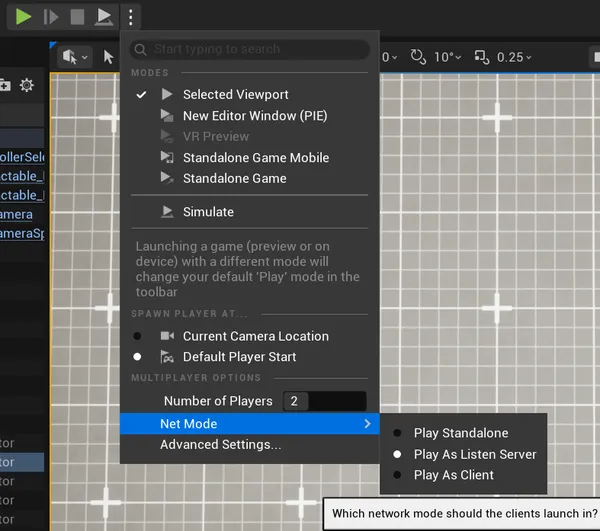
Set Number of Players to 2 and Net Mode to Play As Listen Server. The first window is the host, and the second is a network client connected to it. Test in both, because they hide different bugs: the host window won't show missing replication, wrong ownership or client-side writes, and the client window won't show a forgotten manual OnRep call, which only breaks visuals on the host.
Two more settings help:
- Network emulation (Play settings > Advanced Settings): add 60 to 100 ms of latency and a bit of packet loss. On localhost the two worlds stay almost in sync, which hides the delay this article is about, and emulated lag makes the gaps between them visible and reproducible.
- Run Under One Process is on by default and fine for daily work. It shares the editor process state between instances, so before trusting a milestone, run at least once with it off: some bugs (config, singletons, load order) only appear with separate processes.
The special case of abilities
If you use the Gameplay Ability System, part of the replication work is done for you, and knowing which part makes GAS easier to work with.
What GAS replicates for you:
- Ability grants: given on the server, the specs replicate to the owning client.
- Activation state: the AbilitySystemComponent coordinates activating, canceling and ending an ability between server and owning client, according to the ability's Net Execution Policy.
LocalPredictedstarts on the client immediately and the server confirms or rolls back, which is the usual choice for player actions.ServerOnlyis the safe choice for anything that changes world state, andServerInitiatedandLocalOnlycomplete the list. - Attributes: an AttributeSet replicates its attributes like any C++
ReplicatedUsingproperty, so the same OnRep rules apply, including "clients only". TheGAMEPLAYATTRIBUTE_REPNOTIFYmacro is there to make prediction work in those OnReps. - Gameplay cues: the GAS channel for cosmetics. They work like managed multicasts, so a missed cue is lost like any other event.
- Montages played through ability tasks, and tags applied by gameplay effects.
What GAS never replicates:
- Member variables of your ability instances. A
LocalPredictedability runs one instance on the client and one on the server, and they don't share state, so a value computed in one is absent from the other. - Internal state of ability tasks, for the same reason.
- Target data: what the player aimed at is only known by the client, and it must be sent explicitly (
ServerSetReplicatedTargetDatain the target data flow) for the server to act on it. - Loose gameplay tags added directly on the ASC, which are local by default, while tags granted by effects replicate.
GAS follows the data-first pattern: abilities carry events and their validation, attributes and tags carry state, and cues carry disposable cosmetics. For a two-player coop, set the ASC replication mode to Mixed on player pawns and the defaults will do the right thing.
To sum up, there are two worlds and only the server's holds the truth. State flows down and events flow up: the server changes the data, and every screen, the host's included, displays what it derives from that data. Ownership decides which actors can carry a client's events up to the server. When something is wrong on one screen only, ask which world ran the line that produced it.