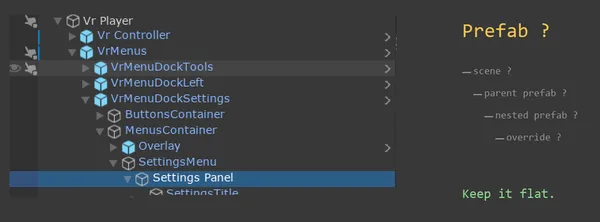
The natural reflex: split everything into prefabs
When structuring a Unity project, the instinct is often to turn every reusable element into a prefab. A menu? Prefab. A settings sub-menu? Prefab. A custom button inside it? Prefab. It sounds logical: it's modular, it's clean, it's "well-architected".
Splitting things up has its benefits, since team members can each work on their own part of the scene without creating merge conflicts. In practice though, nesting has a hidden cost that shows up when you try to change something.
Where is the config?
Let's take a concrete case. On one of my projects, a colleague asked me why the Settings menu wasn't a separate prefab. Its configuration is attached directly to the parent prefab VRMenus, so to modify Settings, you have to go through VRMenus.
At first glance this looks like a flaw. However, as soon as you nest prefabs, each level of nesting becomes a place where configuration can be saved or overridden. When you make a change, finding where it applies quickly becomes a headache:
- Is the change saved on the scene?
- Or was it applied on the parent prefab?
- Or on the nested prefab itself?
If prefabs get added here and there, there can be even more intermediate levels where the property's final value differs from what is configured in the prefab. You then have to hunt through the intermediate prefabs up to the scene to find which one overrides the value, and no Unity tool helps with that.
The rule I follow
To avoid this complexity, I keep prefab depth to a strict minimum:
Ideally, a single level of prefab. The prefab contains everything it needs directly, with no nested prefab. Configuration lives in one place, and changes are predictable.
Sometimes, a second level for ultra-generic components. A button, a text field, a progress bar -- this type of basic UI component deserves to be a prefab as part of a design system. Including a generic prefab inside a specialized one remains manageable: the generic component is rarely modified, and its overrides are easy to spot.
Never nest multiple specific prefabs inside each other. When you nest prefabs that each have their own business logic and their own configuration, the number of places to look for a problem multiplies. In the end, debugging costs me more time than the "modularity" saves.
The problem is conceptual
This stance might seem to go against the grain. Nested prefabs were introduced in Unity 2018.3 as a major feature, and they do solve real reusability problems. The issue runs deeper than the interface, though.
Better tooling would speed up debugging, for instance an editor that displays "this value comes from prefab X, overridden at level Y". But the cognitive load would remain: when I modify a value, at which level do I want the change to apply? On the source prefab, impacting all its instances, or only on this specific instance? With two levels the question is easy to answer. With four or five, it becomes a mental exercise on every single edit.
Each extra level creates another situation where you have to ask who owns the data and where it belongs, and another opportunity for an intermediate prefab to override a setting when it shouldn't.
That's why I prefer to limit depth at the source.
Find me on social networks
If you found this article helpful, check my other articles and don't forget to follow me on your favorite network for more game development tips and discussions.